
Every business already collects data: sales in the ERP, invoices in the accounting system, customers in a CRM, and plenty more in spreadsheets. The hard part isn't having data. It's getting a straight answer out of it when you need one. That's what Business Intelligence (BI) is for.
Key takeaways
- BI is less about software and more about getting reliable answers quickly.
- The biggest win is usually time: reports that took days now update themselves.
- It only works if everyone agrees what each number means, so start there.
What Exactly is Business Intelligence?
People often think of BI as a piece of software, usually a dashboard. The dashboard is just the part you see. Business Intelligence is really a process: collecting the data your business already has, cleaning it up, and presenting it so that the people making decisions can see what's going on.
A simple test: if your managing director asks "how did we do last month compared to last year, by product?", how long does it take to get an answer? If the honest answer is "a couple of days, and it depends who's in the office", that gap is what BI closes.
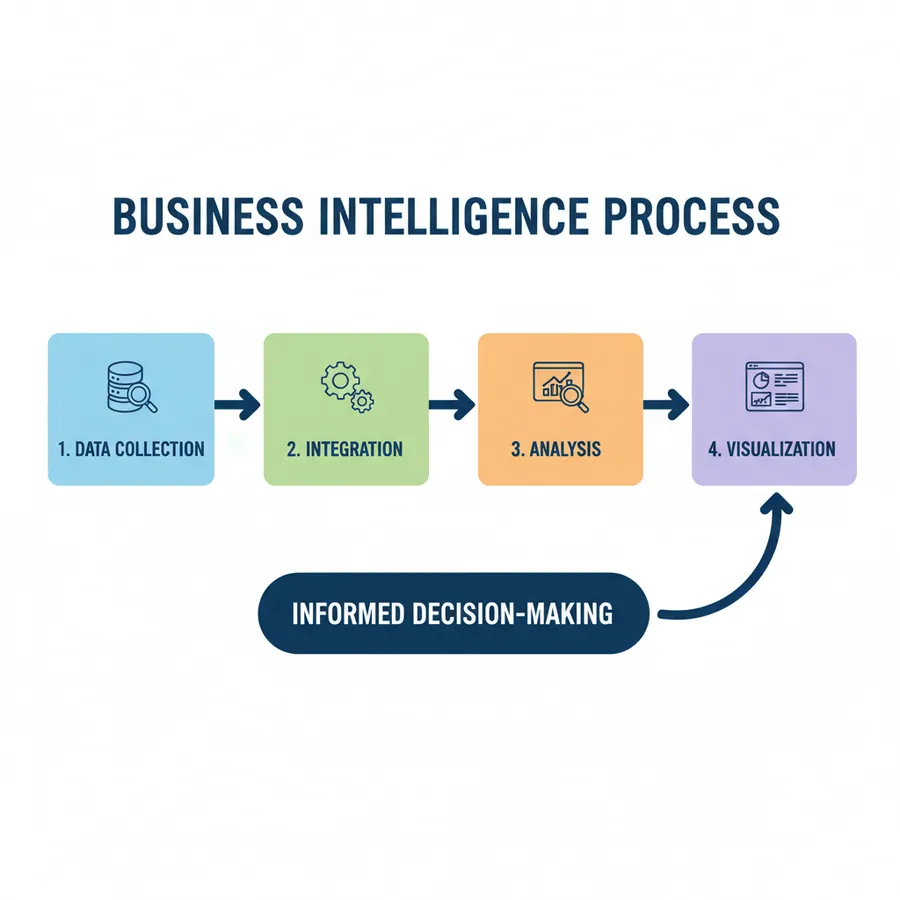
In practice, it comes down to four steps:
- Data Collection: Pulling data from the places it already lives: your ERP, accounting software, CRM, e-shop and, yes, spreadsheets.
- Data Integration and Storage: Cleaning it and putting it in one place, so a customer or a product means the same thing everywhere. For bigger setups this is a data warehouse.
- Data Analysis: Building the calculations once (margin, growth, stock days) so nobody has to rebuild them in Excel every month.
- Data Visualization and Reporting: Showing the results in dashboards and reports people can filter themselves, on a laptop or a phone.
What BI Actually Does for a Business
BI used to be something only large companies could afford. Tools like Power BI have changed that, and a small team can now get the same kind of visibility for the cost of a few software licences. Here's what it gives you:
1. Make Data-Driven Decisions, Not Guesses
Gut feeling still matters, especially in a small business where the owner knows the customers well. But it works much better with numbers behind it. Instead of asking "why do we think sales are down?", you can see which products dropped, with which customers, and since when.
2. Identify New Revenue Opportunities
Some patterns only show up when you look at all your sales together. You might find that customers who buy product A nearly always come back for product B a month later. That's a bundle, or a follow-up email, waiting to happen.
3. Improve Operational Efficiency
Where does time or money leak out of the business? Late deliveries, stock sitting in the warehouse for months, jobs that always run over budget. BI makes those visible, and once something is visible it usually gets fixed.

4. Gain a Competitive Advantage
Most of your competitors are probably still running on monthly Excel reports. If you see a problem in week one instead of week five, you can react a month earlier than they can. For a small business, that head start counts for a lot.
5. Enhance Customer Experience
Put purchase history, support tickets and feedback side by side and you start to see which customers are drifting away and why. That's much cheaper to act on than winning new customers to replace them.
6. Mitigate Risk and Support Compliance
BI can warn you early: a customer whose overdue balance keeps growing, margins slipping on a product line, or numbers that don't reconcile. Set a simple alert on the figures that matter and you find out in days, not at year-end.
Bringing BI to Life: Real-World Applications
It's not just for the finance team. Here's how different parts of a business typically use it:
Sales & Marketing
See which products, customers and campaigns actually make money, not just which ones sell the most.
Finance
Close the month faster, compare actuals to budget, and keep an eye on cash and overdue invoices.
Operations
Spot slow-moving stock before it ties up cash, and see which suppliers deliver late.
Human Resources
Follow headcount, overtime and staff turnover without chasing three different spreadsheets.

Getting Started with Business Intelligence
You don't need a big project to start. This is the order we usually suggest:
- Write down your questions: Which numbers do you ask for every week or month and wait too long to get?
- Find where the data lives: List the systems and files those numbers come from, and who looks after each one.
- Choose a tool: Power BI, Tableau and Looker are the best-known options. For most small businesses already on Microsoft 365, Power BI is the natural fit. We compare it with Excel in Power BI vs Excel for small business.
- Get people using it: A dashboard nobody opens is wasted money. Bring it into your weekly meetings and stop sending the old Excel version.
The Bottom Line
Without BI, your data tells you what happened, eventually, after someone has spent a few days pulling it together. With BI, it tells you what's happening now and where to look next. You don't need to do everything at once. Pick the one question you most often struggle to answer, and start there.
Want help implementing BI dashboards or a data warehouse? We work with businesses in Cyprus and Thessaloniki. Visit our Services or Contact us.
About the author
Data Superheroes helps SMEs build analytics systems: data pipelines, warehouses, dashboards, and AI automation.